
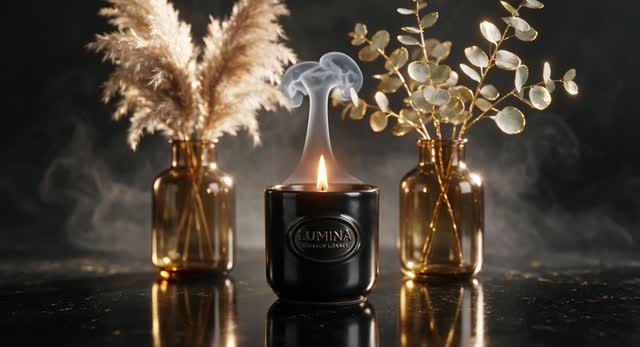
Product reveal
Starting image
A polished product shot on a reflective studio surface with dramatic rim lighting.
Motion direction
Slow orbiting camera, gentle light sweep across the product, subtle particles, premium commercial pacing.
Create images, animate ideas, and turn still visuals into AI videos
Explore Grok Imagine for AI image generation, image editing, and video creation. Learn the workflow, try practical prompts, and animate your images with Grok Imagine directly in ImageVids AI.
Creative preview
Grok Imagine
Loading history...
Generated videos will appear here after you upload an image or write a text prompt.
Image-to-video ideas
A strong still image sets the visual identity. A focused motion prompt then adds camera movement, subject action, and atmosphere without rewriting the scene.
Starting image
A polished product shot on a reflective studio surface with dramatic rim lighting.
Motion direction
Slow orbiting camera, gentle light sweep across the product, subtle particles, premium commercial pacing.
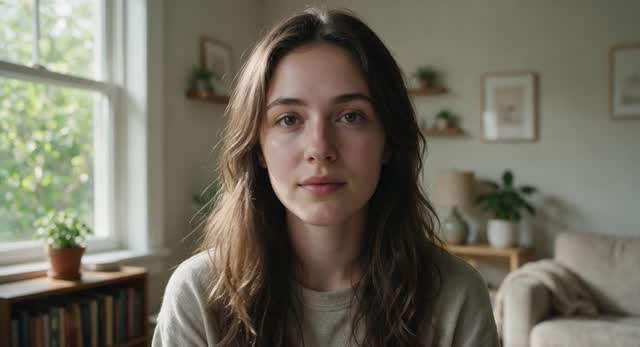
Starting image
A close portrait with soft window light, shallow depth of field, and natural detail.
Motion direction
Subtle breathing and blinking, hair moving in a light breeze, slow camera push-in, realistic motion.
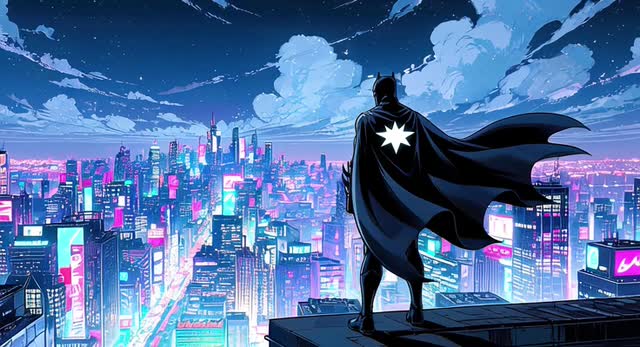
Starting image
An illustrated hero overlooking a neon city at night beneath drifting clouds.
Motion direction
Coat and hair fluttering, city lights pulsing, clouds drifting, cinematic pan from the skyline to the character.
Model type
AI image and video generation
Best for
Fast concepts, stylized visuals, and short motion
Inputs
Text prompts and source images
Workflows
Image creation, editing, and image to video
Complete model guide
Grok Imagine is a creative generation experience from xAI that brings image and video creation into the Grok ecosystem. It can generate new visuals from text, edit existing images, and animate still images into short videos.
For creators, its appeal is speed and range: you can explore a visual direction, refine an image, and test motion without building a complex production pipeline first.
This guide focuses on practical use—what the model can do, how to write clearer prompts, where image-to-video fits, and when another model may better suit the job.
Official Grok and xAI documentation describes Imagine as supporting image generation, image editing, video generation, and animation from still images.
Core capabilities
Use the model across the early creative process, from a first visual concept to an animated result.
Turn a written concept into portraits, product scenes, illustrations, cinematic frames, and stylized artwork. Specific subject, lighting, composition, and mood details improve control.
Start with a still image and describe the motion you want: camera movement, subject action, environmental effects, and pacing. This is useful when visual identity is already established.
Create short video ideas from prompts or source images. Use concise direction for the subject, action, camera, atmosphere, and timing, then refine one variable at a time.
Hands-on workflow
Upload an image or begin with a prompt, select Grok Imagine, describe the motion, and generate in one focused workspace.
Upload a clear image for animation, or switch to text mode when you want to generate from an idea.
Select Grok Imagine in the model menu and review the available duration, aspect ratio, and quality settings.
Write the subject, action, camera behavior, environment, and mood in direct visual language.
Review the clip, then adjust one detail—such as camera speed or subject motion—for a more controlled next result.
Prompt library
Separate the visual brief from the motion brief. It makes each stage easier to control and revise.
Image prompt
Cinematic close-up portrait of a young explorer at sunrise, warm rim light, windswept hair, natural skin texture, shallow depth of field, 85mm lens look.
Motion prompt
The subject blinks and turns slightly toward the light. A soft breeze moves the hair as the camera slowly pushes in. Natural, restrained motion.
Image prompt
Luxury perfume bottle on black stone, violet backlight, fine mist in the air, crisp glass reflections, premium studio advertising photography.
Motion prompt
Slow clockwise camera orbit. Light glides across the glass while mist drifts behind the bottle. Smooth, elegant commercial movement.
Image prompt
Anime swordswoman on a rain-soaked rooftop, neon city reflections, dynamic pose, dramatic clouds, detailed illustrated style.
Motion prompt
Rain falls diagonally as the character shifts stance and raises the sword. Hair and coat react to the wind. Fast push-in, then hold.
Image prompt
Ancient floating temple above a sea of clouds, waterfalls falling into the sky, golden dawn, monumental scale, cinematic fantasy concept art.
Motion prompt
Camera glides toward the temple while clouds roll beneath it. Waterfalls shimmer and distant birds cross the frame. Slow, majestic pacing.
Creative applications
Explore visual directions for campaigns, scenes, thumbnails, and mood boards before committing to production.
Animate an approved still while preserving its composition, art direction, character, or product identity.
Create polished product scenes and short motion concepts for ads, landing pages, and social launches.
Test portraits, costumes, expressions, and stylized character moments across several creative directions.
Produce attention-grabbing short clips, visual hooks, and vertical content ideas for fast publishing cycles.
Build atmospheric establishing shots and brief narrative moments for pitches, storyboards, and previsualization.
Model comparison
No single model wins every project. Compare the desired output, controls, and production workflow before choosing.
| Model | Best for | Notable strength | Choose it when |
|---|---|---|---|
| Grok Imagine | Fast visual ideation and stylized image-to-video | Creative range across images, edits, and motion | You want to move quickly from an idea or image to a short visual result. |
| ImageVids AI | Comparing multiple AI video models | One workflow for models, uploads, prompts, and generation history | You want flexibility without rebuilding the workflow for every model. |
| Kling AI | Cinematic motion and multi-shot storytelling | Detailed movement and scene continuity | Motion polish and cinematic sequencing are the priority. |
| Veo | Premium cinematic video and audio | High-fidelity visuals and production-oriented output | You need a polished result for a higher-end creative workflow. |
| Seedance | Prompt following and multimodal control | Flexible reference-driven direction | Your scene depends on multiple inputs or precise creative guidance. |
Model access, settings, and output behavior can change. Test the same short prompt across suitable models to compare motion, consistency, and visual style for your own project.
Responsible creation
AI-generated results can vary between runs. Complex hands, text, fast action, identity consistency, and long sequences may need additional attempts or editing. Clear prompts and simple shots usually provide more control.
Only upload content you have the right to use. Avoid deceptive impersonation, non-consensual intimate content, illegal material, and requests that violate platform rules or another person's rights.
Keep exploring
Turn anime images and original character art into short videos for story scenes, manga moments, and social posts.
Explore this toolCreate videos from text prompts or uploaded images, compare models, and control duration, ratio, resolution, and audio.
Explore this toolConvert a photo, design, or AI-generated image into a dynamic video directly in your browser.
Explore this toolStart with the result you want to create. Each model offers a different balance of speed, visual fidelity, creative control, reference support, and audio generation.
Explore this toolEvery tool is designed around a clear search intent and creative task, so you can move from an idea or source image to the right workflow faster.
Explore this toolFAQ
Grok Imagine is an xAI creative generation experience for producing and editing images and creating short videos from prompts or still images.
Yes. Official xAI documentation describes image generation and image editing capabilities, including prompt-based creation and transformations of existing images.
Yes. Grok Imagine supports short-form video creation and can generate motion from a text direction or a source image, depending on the available workflow.
Yes. Upload the image, choose an image-to-video workflow, and describe camera movement, subject action, atmosphere, and pacing in the motion prompt.
Yes. Select Grok Imagine in the ImageVids AI generator, add a prompt or source image, choose your available settings, and generate from the same workspace.
Describe the subject, setting, visual style, composition, lighting, and mood. For video, add the main action, camera movement, environmental motion, and pacing.
The best alternative depends on the task. Kling suits cinematic motion, Veo suits premium video and audio, and Seedance suits multimodal control. ImageVids AI helps compare these workflows in one place.
Use it responsibly: follow platform policies, respect privacy and intellectual property, avoid deceptive or harmful content, and review every output before publishing.
Start with a strong image or a clear visual idea, then add focused motion direction.
Create, compare, and refine with Grok Imagine inside ImageVids AI.
Start with the result you want to create. Each model offers a different balance of speed, visual fidelity, creative control, reference support, and audio generation.
Director-style multimodal control using image, video, and audio references for complex creative scenes.
Use this modelCinematic multi-shot storytelling with expressive motion, scene continuity, and native sound support.
Use this modelExplore MindVideo AI text-to-video and image animation, with creative prompts and practical workflows for your next clip.
Use this modelExplore A2E’s photo animation and talking-avatar workflows, with an ImageVids AI workspace for image and text videos.
Use this model