
Supported inputs
Text, image, video, and audio
Direct text, image, video, and audio in one creative workflow
Use Seedance 2.0 to create short AI videos with synchronized sound and reference-driven control. Start from a prompt or guide the scene with images, video clips, and audio, then choose the duration and resolution that fit your project.
Loading history...
Generated videos will appear here after you upload an image or write a text prompt.
These practical limits help you plan a shot before generating. Available settings in ImageVids AI reflect the current model workflow and may evolve as access changes.
Supported inputs
Text, image, video, and audio
Clip duration
4, 6, 8, 12, or 15 seconds
Native resolution
480p or 720p
Sound workflow
Synchronized audio-video generation
Seedance 2.0 is ByteDance Seed's multimodal audio-video generation model. Instead of treating every project as a text-only request, the model can use text, images, video clips, and audio as creative references inside a unified generation workflow.
That makes the model useful when a written prompt is not enough. A product image can anchor appearance, a short video can communicate movement or camera language, and an audio reference can guide dialogue, rhythm, or atmosphere. The prompt then explains how those elements should work together.
ImageVids AI provides independent access to Seedance 2.0 through a browser-based generator. You can test the standard model or the faster variant, review the estimated credit use, and keep different AI video models in one workspace without claiming an official ByteDance affiliation.
Model capabilities and specifications on this page are based on the official ByteDance Seed overview and the Seedance 2.0 model card. ImageVids AI describes only controls currently available in its own generator.
Choose the simplest input that can communicate your intent. Add references only when they provide information that would be difficult to describe clearly in text.
Build a shot from a written brief covering the subject, action, setting, composition, camera movement, lighting, sound, and pacing. Seedance 2.0 works best when each shot has one clear visual objective.
Use a source image to preserve a product, character, art direction, or starting composition. Describe only the motion and changes you want, so the model does not have to reinterpret every visual detail.
Combine image, video, and audio references when a scene depends on appearance, movement, performance, or timing. References should have distinct roles; conflicting guidance can reduce consistency.
Plan speech, ambience, effects, or musical rhythm with the visual action. Keep dialogue concise enough for the selected clip length and state who speaks, when the line begins, and what happens on screen.
Use these visual references to plan framing, movement, and pacing before writing your prompt. Actual results vary by model, input, and generation settings.
 01
01Plan reflections, camera movement, and a clean ending frame for compact product ads and campaign concepts.
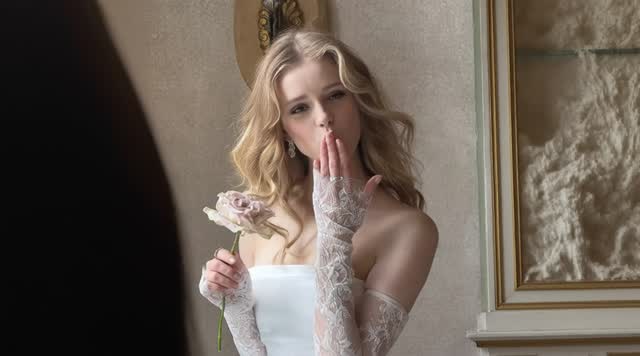 02
02Pair a clear visual reference with subtle gestures, restrained camera movement, and natural pacing.
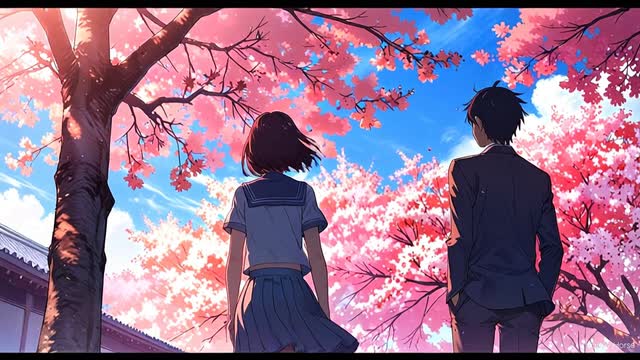 03
03Define what should remain stable, then direct hair, clothing, effects, and atmosphere through the prompt.
A controlled Seedance 2.0 workflow starts with a small, testable shot. Lock the subject and camera idea first, then add references and production detail only where they improve the result.
Define the subject, main action, environment, camera behavior, lighting, sound, and ending state. Avoid packing several unrelated scenes into one short generation.
Upload only media you have the right to use. Assign each image, video, or audio reference a specific job such as character appearance, product detail, movement, or timing.
Use Seedance 2.0 for director-style control or Seedance 2.0 Fast for quicker drafts. Select duration, aspect ratio, resolution, and sound before reviewing the credit estimate.
Check subject consistency, motion, framing, audio timing, and unwanted artifacts. Change one variable at a time so you can tell which edit improved the next result.
A useful prompt reads like a compact shot plan, not a pile of adjectives. Put the essential action first, use concrete camera language, and give the scene a clear ending.
Reusable prompt formula
[Shot and camera] + [subject] + [single action] + [environment] + [lighting and style] + [audio] + [ending state]
For reference-to-video, tell Seedance 2.0 what each uploaded asset controls. For example: use Image 1 for the product design, Video 1 for camera motion, and Audio 1 for pacing.
Use a clean product image as the visual reference. Keep branding and geometry stable while directing the light and camera.
Macro product shot of the referenced watch on black stone. Slow clockwise camera orbit as a narrow light sweep reveals the metal texture. Fine mist drifts in the background. Premium commercial lighting, restrained movement, crisp reflections. End on a centered hero frame with a soft mechanical click.
Use a character image for appearance and a short audio reference for the intended voice rhythm. Keep the spoken line brief.
Medium close-up of the referenced explorer inside a dim observatory. She looks toward the rotating star map and says, “We found the signal.” Slow push-in, subtle breathing, natural blinking, blue instrument light across her face, quiet room tone. End as the star map brightens behind her.
Start with an approved still frame. Preserve its composition and request a limited set of natural movements.
Animate the source image without changing the character design or composition. A light wind moves the coat and hair, clouds drift from left to right, distant city lights pulse softly, and the camera makes a slow three-second push-in. Cinematic night ambience. Hold the final frame for one second.
Both options support the same core multimodal workflow in ImageVids AI. Choose based on whether your current goal is rapid iteration or a more deliberate final pass.
| Model | Best for | Recommended workflow | Choose it when |
|---|---|---|---|
| Seedance 2.0 | Director-style control and considered final shots | Refine the prompt and reference roles before generating | The scene depends on precise visual, motion, or audio direction |
| Seedance 2.0 Fast | Drafts, exploration, and faster visual iteration | Test framing and motion quickly, then promote the strongest direction | You need to compare several ideas before committing more time or credits |
Generation time and credit use vary with duration, resolution, demand, and model settings. Check the live estimate in the Seedance 2.0 generator before submitting.
Seedance 2.0 is most valuable when references and clear direction reduce ambiguity in a short-form production task.
Prototype product reveals, branded visual hooks, and campaign shots from approved product and style references before a larger production.
Test camera language, atmosphere, character beats, and audio timing for storyboards, pitch films, and short narrative moments.
Animate a product still, packaging concept, interior, or design asset while keeping the visual reference central to the shot.
Create compact vertical or landscape clips with a clear opening hook, controlled action, and an ending frame designed for editing.
Seedance 2.0 outputs can vary between generations. Crowded scenes, long dialogue, rapid multi-character action, precise typography, and conflicting references may need simpler direction or several attempts. Review every result before publishing.
Use only prompts and media you are authorized to use. Do not create deceptive impersonation, non-consensual intimate material, illegal content, or material that infringes copyright, trademark, privacy, publicity, or likeness rights.
Turn anime images and original character art into short videos for story scenes, manga moments, and social posts.
Explore this toolCreate videos from text prompts or uploaded images, compare models, and control duration, ratio, resolution, and audio.
Explore this toolConvert a photo, design, or AI-generated image into a dynamic video directly in your browser.
Explore this toolTest image-to-video generation with free trial credits before choosing a paid plan or adding more capacity.
Explore this toolStart with the result you want to create. Each model offers a different balance of speed, visual fidelity, creative control, reference support, and audio generation.
Explore this toolSeedance 2.0 is a ByteDance Seed multimodal audio-video generation model. It supports text, image, video, and audio inputs so creators can guide appearance, motion, camera behavior, timing, and sound in one workflow.
ImageVids AI provides trial credits after sign-in. Seedance 2.0 generations consume credits based on the selected model, duration, resolution, and options, so free access is a limited trial rather than unlimited generation.
You can use Seedance 2.0 in the generator on this page through ImageVids AI. ByteDance also maintains the official Seedance 2.0 model information page. ImageVids AI is an independent access provider, not the official ByteDance website.
The model supports text, image, video, and audio inputs. In ImageVids AI, the current reference workflow accepts up to five media items, subject to the file types and controls shown in the generator.
Yes. Upload an image as a visual reference, select the model, and describe the subject motion, camera movement, environmental effects, sound, and desired ending. Preserve important details by stating what must remain unchanged.
The current ImageVids AI workflow offers 4, 6, 8, 12, and 15-second clips at 480p or 720p. Available settings can change, so confirm the active options in the generator before starting a project.
Seedance 2.0 is positioned for director-style control, while Seedance 2.0 Fast is intended for faster iteration. Use Fast to explore framing or motion, then compare the standard model when the shot needs more deliberate control.
No. ImageVids AI is an independent AI creative platform that provides access to multiple video models. It is not affiliated with or endorsed by ByteDance, and links to the official source are provided for verification.
Start with one focused shot, give every reference a clear role, and review the credit estimate before generating.
Use Seedance 2.0 in ImageVids AI to move from a creative brief to a directed short video with visual and audio control.
Start with the result you want to create. Each model offers a different balance of speed, visual fidelity, creative control, reference support, and audio generation.
Fast, imaginative video generation for bold concepts, realistic movement, and rapid visual experimentation.
Use this modelCinematic multi-shot storytelling with expressive motion, scene continuity, and native sound support.
Use this modelExplore MindVideo AI text-to-video and image animation, with creative prompts and practical workflows for your next clip.
Use this modelExplore A2E’s photo animation and talking-avatar workflows, with an ImageVids AI workspace for image and text videos.
Use this model